Desk Posture for Kids: Setting Up for School Success
- Juliana Lucky

- Jan 7
- 8 min read
Most children spend 6 to 8 hours a day sitting at a desk, whether at school or at home doing homework. That's a lot of sitting. And when the desk, chair, or screen height doesn't fit a child's body, slouching becomes the default position. I see this pattern constantly in my work as a posture correction specialist. The good news: desk posture for kids is one of the easiest things to fix, because it's mostly about the setup, not the child. In this post, I'll walk you through exactly how to adjust your child's desk and chair for proper posture, what signs to watch for, and simple habits that make a real difference at every age.

Why Desk Posture for Kids Matters More Than You Think
Children's spines are still growing and developing, which makes them more adaptable but also more vulnerable to repetitive positioning. When a child sits with rounded shoulders, a forward head, or a twisted spine for hours each day, their muscles learn those patterns. Over time, the body starts to treat slouching as "normal."
A 2019 study published in the Journal of Physical Therapy Science found that children who sat at improperly sized desks showed significantly higher rates of neck and shoulder discomfort compared to children with ergonomically fitted workstations. The American Academy of Pediatrics also notes that prolonged poor sitting posture contributes to musculoskeletal complaints in school-age children.
This isn't about perfection. Kids will wiggle, shift, and lean. That's healthy. Good desk posture for kids means making the default seated position a strong one, so their body has a reliable "home base" to return to between all that natural movement.
How Should a Child Sit at a Desk: The Basic Checklist
Improving desk posture for kids comes down to a few simple checkpoints. Here's what I tell every parent who asks me how should a child sit at a desk.
Feet Flat on the Floor (or a Footrest)
A child's feet should rest flat, with knees bent at roughly 90 degrees. If their feet dangle, it pulls the pelvis into a tilt and makes the lower back round. For younger kids or shorter children, a sturdy box, a stack of books, or a small step stool under the desk works perfectly as a footrest.
Hips Pushed to the Back of the Chair
The child's bottom should be all the way back in the seat. Many kids sit on the front edge of the chair and then slump backward. Sliding their hips to the back gives the chair a chance to support their lower spine.
Elbows at Desk Height
When a child's arms rest on the desk, the elbows should sit at about 90 degrees. If the desk is too high, the shoulders creep upward. If it's too low, the child hunches forward. Adjustable chairs make this much simpler, but a firm cushion on the seat can raise a smaller child to the right height.
Screen at Eye Level
For children using a computer or tablet, the top of the screen should be roughly at eye level. Looking down at a screen for hours strains the neck and pulls the head forward. A simple laptop stand, a stack of books, or a monitor riser can fix this in seconds. I use this trick with both my kids (ages 5 and 9) and it made a noticeable difference in how they hold their heads during screen time.

Ergonomic Desk Setup for Children at Different Ages
Desk posture for kids changes as they grow, because their bodies change so much between ages 5 and 15. A setup that works for a first grader won't work for a middle schooler. Here's what to prioritize at each stage.
Ages 5 to 7: Keep It Simple
Young children don't sit still for long, and that's perfectly fine. At this age, focus on getting the chair and desk at the right heights. Many standard school desks are too tall for smaller kids. At home, a child-sized table and chair set is ideal. If you're using a regular dining table, add a booster seat and a footrest.
Short homework sessions (15 to 20 minutes) with movement breaks in between work best. At this age, desk posture for kids isn't about sitting perfectly for an hour. It's about building the habit of starting in a good position.
Ages 8 to 11: Build the Workspace
By this age, homework sessions get longer and many children begin using computers regularly. This is when an ergonomic desk setup for children becomes more important. Consider an adjustable desk chair with lumbar support, or place a small rolled-up towel behind their lower back.
If your child uses a laptop, pair it with an external keyboard and a laptop stand. This separates the screen from the typing surface, so one can be at eye level while the other stays at elbow height. Even a basic setup makes a big difference.
Ages 12 and Up: Address Screen Time
Teenagers often spend 3 to 5 hours on computers for school alone, plus personal screen time. At this age, the workspace should look like a miniature version of an adult ergonomic setup. A proper desk chair, a monitor at eye level, and a keyboard at elbow height are all worth the investment.
I also recommend a simple timer rule: every 30 minutes, stand up and move for 2 minutes. This can be as simple as walking to the kitchen for water or doing a few shoulder rolls. Research from the National Institutes of Health confirms that regular movement breaks reduce musculoskeletal discomfort in prolonged sitters of all ages.

Five Signs Your Child's Desk Setup Needs Fixing
Sometimes the setup looks fine but isn't working. Here are the signs I tell parents to watch for:
Your child complains of neck or shoulder pain after homework
They consistently lean to one side while writing or typing
Their chin juts forward toward the screen (a sign the screen is too low)
They sit on their legs or tuck one foot underneath them (a sign the chair is too high)
They constantly fidget or ask to stand up (the chair may be uncomfortable, not the child)
If you notice any of these patterns, adjust one thing at a time. Start with chair height, then desk height, then screen position. Most desk posture for kids problems can be solved with small changes and no complicated equipment.
Simple Habits That Support Kids Sitting Posture at Desk
Equipment alone won't fix desk posture for kids. Habits matter just as much. Here are the ones I recommend to families in my practice.
The "Reset" Reminder
Instead of telling your child to "sit up straight" (which only works for about 30 seconds), try a reset cue. Pick a natural trigger: finishing a math problem, turning a page, or saving a document. At that moment, the child checks their feet, back, and head position. It takes 3 seconds and builds awareness without nagging.
Movement Breaks Every 20 to 30 Minutes
Young children naturally take breaks. Older kids and teens need a nudge. A simple kitchen timer or a phone alarm works. During the break, the child can stretch their arms overhead, roll their shoulders, do a few toe raises, or just walk around the room. Even 60 to 90 seconds of movement helps reset the spine and wake up muscles that go "dormant" during sitting.
I cover movement break routines in more detail in my Posture and Feet course, where families get step-by-step video guides for daily habits that take less than 10 minutes.
Switch Positions During Long Sessions
Sitting in the same position for an hour isn't good for anyone. Encourage your child to alternate between sitting at the desk, standing at a counter, and sitting on the floor with a clipboard. Variety is the best desk posture strategy for kids of any age. The spine thrives on movement and position changes, not one "perfect" static pose.

Common Desk Posture Mistakes to Avoid
A few well-meaning habits actually make desk posture for kids worse:
Buying an adult-sized desk "so they can grow into it." Oversized furniture forces bad posture right now. Get furniture that fits today and adjust as they grow.
Using a soft, squishy chair. Kids need a firm, supportive seat, not a beanbag or a cushioned gaming chair that lets them sink in.
Placing the computer on a bed or couch for homework. Soft surfaces make it impossible to maintain spinal alignment. A flat, hard surface is always better.
Constantly reminding them to sit up straight. This creates tension and frustration for everyone. Fix the setup instead. When the environment is right, good posture becomes the path of least resistance.
If your child tends to slouch during homework, my guide on exercises for kids who slouch offers practical strengthening moves you can add to their routine. And for parents who've noticed broader posture concerns, my post on signs of poor posture in children can help you spot what to look for beyond the desk.
You May Also Like
If this post was helpful, you might also enjoy these related articles:
Screen Time and Your Child's Posture: What to Watch For (covers screen-specific posture concerns and how devices affect the spine)
7 Posture Exercises Kids Can Do at Home in 10 Minutes (simple daily exercises that build the core and back strength needed for good sitting posture)
Signs of Poor Posture in Children: What Parents Should Look For (a full guide to recognizing posture patterns early)
Test Your Knowledge: Desk Posture Quiz
Question 1: What is the ideal angle for a child's knees when sitting at a desk?
A) 45 degrees
B) 90 degrees
C) 120 degrees
D) Knees should be straight
Answer: B) 90 degrees. Feet should be flat on the floor with knees bent at roughly a right angle.
Question 2: What should you do if your child's feet don't reach the floor?
A) Let their feet dangle freely
B) Tell them to cross their legs
C) Use a footrest, box, or stack of books
D) Lower the desk instead
Answer: C) Use a footrest, box, or stack of books to support their feet.
Question 3: Where should the top of a computer screen be positioned?
A) Below chin level
B) At chest height
C) At or near eye level
D) Above the head
Answer: C) At or near eye level to prevent neck strain from looking down.
Question 4: How often should children take movement breaks during desk work?
A) Every 2 hours
B) Every 20 to 30 minutes
C) Only during lunch
D) Once per homework session
Answer: B) Every 20 to 30 minutes. Even 60 to 90 seconds of movement helps reset posture.
Question 5: Which is the best strategy for improving desk posture long-term?
A) Constantly reminding kids to sit up straight
B) Buying a gaming chair
C) Setting up the desk and chair to fit the child's body properly
D) Having them stand all day
Answer: C) Setting up the desk and chair to fit the child's body properly. A good setup makes correct posture the natural default.
Get a Personal Assessment for Your Child
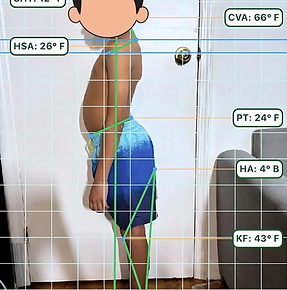
If your child is struggling with desk posture despite these adjustments, or if you've noticed ongoing complaints about back, neck, or shoulder discomfort, a closer look at their individual alignment can help. My personal diagnostic gives you a detailed assessment of your child's posture patterns, with specific recommendations tailored to their body and habits.
Good desk posture for kids isn't about rigid rules or constant corrections. It's about giving your child a workspace that fits their body, then building small habits that stick.




Comments